


Laptop Sleeve Size Guide: Dimensions & Capacity Chart
May 31, 2026
Leave a message
A laptop sleeve should fit the laptop body, not the screen label.
That is the first rule.
A "13-inch laptop" does not mean the computer is 13 inches wide. It means the screen is measured diagonally. The actual laptop body has its own length, width, and thickness, and those numbers decide whether the sleeve fits well.
A good laptop sleeve size guide should answer four questions:
- What laptop size do I have?
- What inner dimensions should the sleeve have?
- Can I also carry a charger, mouse, tablet, or documents?
- Will the sleeve fit inside my backpack, briefcase, or travel bag?
This guide explains how to choose the right laptop sleeve size, how to read dimensions, and how to match capacity with real carrying needs.
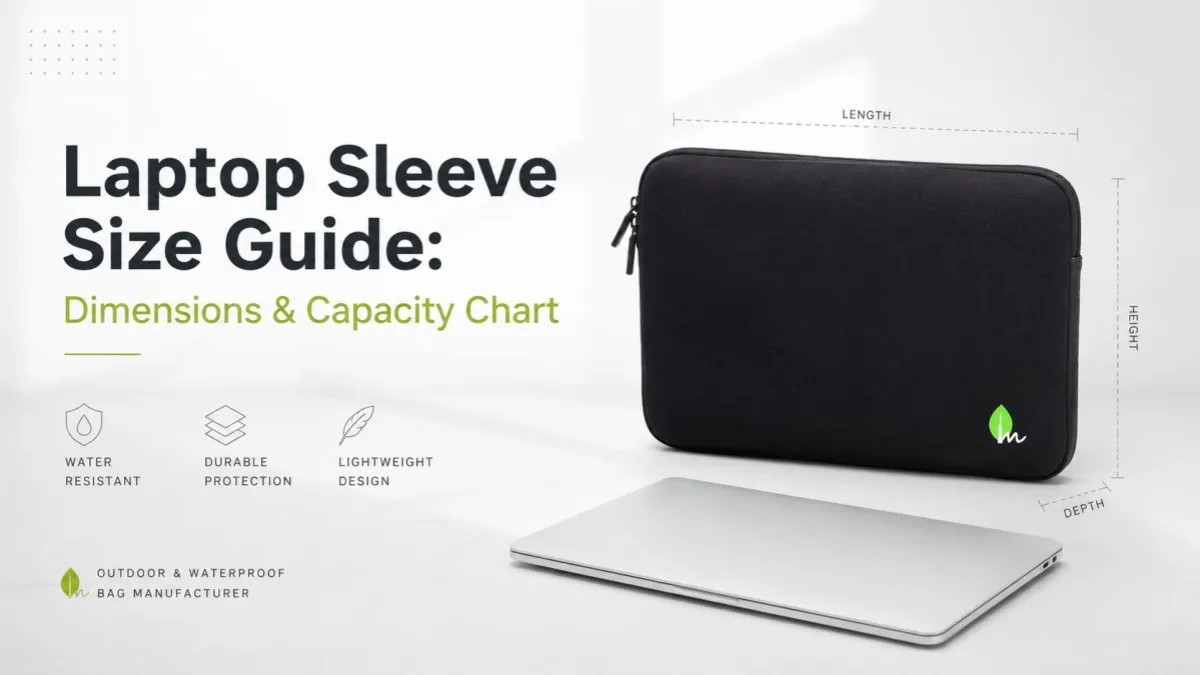
Laptop Sleeve Size & Capacity Chart
A laptop sleeve size chart is a starting point, not the final answer. Different brands use different chassis shapes. A slim 14-inch business laptop and a 14-inch gaming laptop may need different sleeves.
The table below gives practical reference ranges for common laptop sleeve dimensions.
| Laptop Screen Size | Typical Laptop Body Size | Recommended Sleeve Inner Size | Common Device Types | Capacity / Fit Type |
|---|---|---|---|---|
| 11–12 inch | 10.0–11.5 × 7.0–8.2 × 0.3–0.7 in / 25.4–29.2 × 17.8–20.8 × 0.8–1.8 cm | 11.5–12.2 × 8.0–8.8 × 0.8–1.0 in / 29.2–31.0 × 20.3–22.4 × 2.0–2.5 cm | Small Chromebooks, tablets with keyboard, compact laptops | Ultra-compact, usually device only |
| 13–13.6 inch | 11.5–12.5 × 8.0–9.0 × 0.4–0.7 in / 29.2–31.8 × 20.3–22.9 × 1.0–1.8 cm | 12.5–13.2 × 8.8–9.5 × 0.8–1.0 in / 31.8–33.5 × 22.4–24.1 × 2.0–2.5 cm | MacBook Air 13, 13-inch ultrabooks, Surface-style laptops | Slim fit or laptop + thin document |
| 14 inch | 12.2–13.0 × 8.6–9.3 × 0.5–0.8 in / 31.0–33.0 × 21.8–23.6 × 1.3–2.0 cm | 13.0–13.8 × 9.3–10.0 × 0.9–1.1 in / 33.0–35.1 × 23.6–25.4 × 2.3–2.8 cm | Business laptops, 14-inch MacBook Pro, ThinkPad-style laptops | Daily commuting, snug but more flexible |
| 15–15.6 inch | 13.7–14.6 × 9.2–10.2 × 0.6–0.9 in / 34.8–37.1 × 23.4–25.9 × 1.5–2.3 cm | 14.5–15.2 × 10.0–10.8 × 1.0–1.2 in / 36.8–38.6 × 25.4–27.4 × 2.5–3.0 cm | Standard office laptops, 15.6-inch PCs, light creator laptops | Standard fit, may need accessory pocket |
| 16 inch | 14.0–14.5 × 9.5–10.0 × 0.6–0.8 in / 35.6–36.8 × 24.1–25.4 × 1.5–2.0 cm | 14.8–15.5 × 10.3–10.8 × 1.0–1.2 in / 37.6–39.4 × 26.2–27.4 × 2.5–3.0 cm | 16-inch MacBook Pro, creator laptops | Padded fit, often laptop + thin accessories |
| 17–17.3 inch | 15.5–16.5 × 10.5–11.5 × 0.9–1.4 in / 39.4–41.9 × 26.7–29.2 × 2.3–3.6 cm | 16.2–17.2 × 11.2–12.4 × 1.2–1.6 in / 41.1–43.7 × 28.4–31.5 × 3.0–4.1 cm | Gaming laptops, workstations, large engineering laptops | Oversized, needs reinforced padding |
The most useful column is recommended sleeve inner size. That is the usable space inside the sleeve. Product titles can be vague, but inner dimensions tell you whether the laptop can actually fit.
For gaming laptops and mobile workstations, check thickness first. These machines often have raised rubber feet, thicker cooling systems, and sharper rear edges. A sleeve that works for a slim 16-inch laptop may fail on a 16-inch gaming machine.
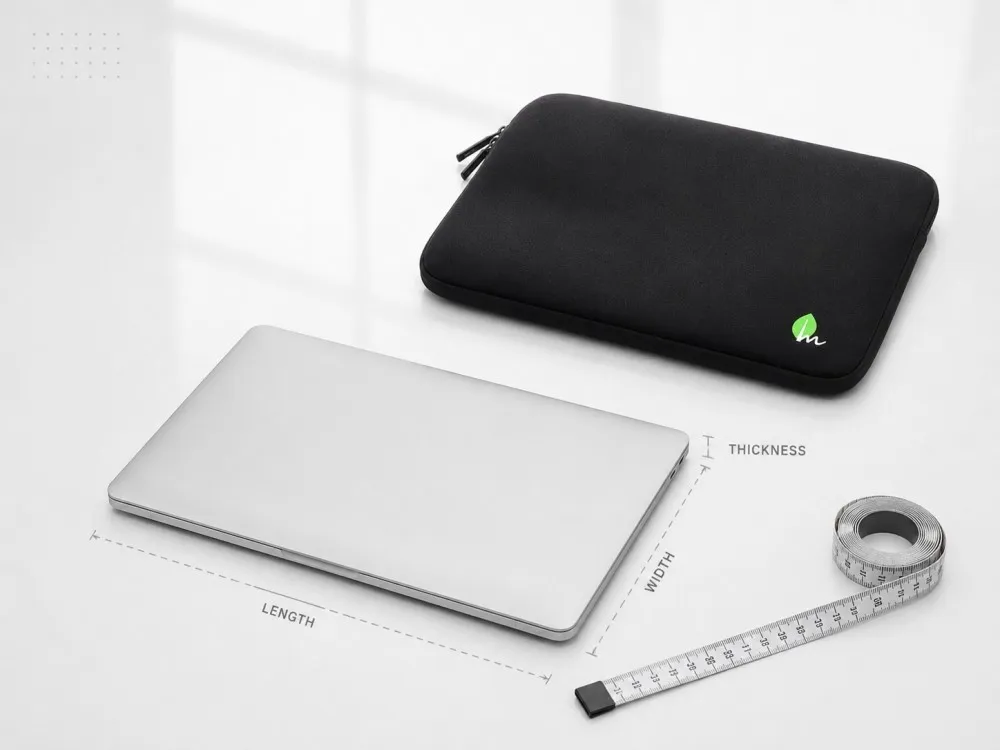
How to Measure Your Laptop for a Sleeve
A laptop sleeve measurement guide starts with three numbers: length, width, and thickness.
Measure the laptop when it is closed. Do not measure the screen only. Measure the full body edge to edge.
Measure Length, Width, and Thickness
For most laptop sleeve specifications:
- Length / width refers to the longest horizontal side of the laptop body.
- Depth / height often refers to the shorter side from front to back.
- Thickness refers to the closed laptop height, including raised feet if they affect fit.
Different sellers use different words. One brand may say width × height × thickness. Another may say length × depth × height. The naming is less important than the actual direction of measurement.
Measure the laptop body, then compare it with the sleeve's inner dimensions.
A simple example:
| Laptop Actual Size | Sleeve Inner Size | Fit Judgment |
|---|---|---|
| 12.0 × 8.5 × 0.6 in | 12.6 × 9.1 × 0.9 in | Good snug fit |
| 12.0 × 8.5 × 0.6 in | 12.1 × 8.6 × 0.6 in | Too tight, zipper may struggle |
| 12.0 × 8.5 × 0.6 in | 14.0 × 10.0 × 1.2 in | Too loose for daily protection |
A sleeve should not feel like a hard case. Soft fabric, foam, and lining need some tolerance to work properly.
Add a Small Buffer for a Comfortable Fit
For most slim and padded laptop sleeves, choose inner dimensions about 0.3–0.6 inch / 0.8–1.5 cm larger than the laptop's length and width.
This gives enough room for:
- fabric thickness
- foam compression
- rounded laptop corners
- zipper opening
- easy insertion and removal
Do not oversize too much. A loose sleeve lets the laptop slide inside the bag, especially when carried vertically in a backpack. That movement reduces shock protection.
A snug fit is the target.
Check Thickness and Zipper Space
Thickness causes more fit problems than many buyers expect.
A 15.6-inch office laptop may be 0.7 inch thick. A 15.6-inch gaming laptop may be over 1.0 inch thick. Both are called 15.6 inch, but they should not use the same slim sleeve.
Zippers also need breathing room. If the laptop fills the sleeve completely, the zipper teeth and slider carry the stress. Over time, this can cause zipper deformation, corner wear, or fabric pulling near the opening.
For thick laptops, choose a sleeve with a gusseted shape, wider zipper path, or reinforced corner design.
Inner Dimensions vs. Outer Dimensions
Inner dimensions are the usable space inside the laptop sleeve. They decide whether the laptop fits.
Outer dimensions are the total outside size of the sleeve. They decide whether the sleeve fits into another bag.
This difference matters in real use. A sleeve with thick foam padding may have an inner size suitable for a 14-inch laptop, but its outer size may be closer to a 15-inch sleeve. That can affect whether it fits into a backpack laptop compartment, waterproof backpack, briefcase, or carry-on travel bag.
Check the dimensions in this order:
- Laptop actual size
- Sleeve inner dimensions
- Sleeve outer dimensions
- Backpack or bag compartment size
For B2B buyers, this is also a product development issue. A laptop sleeve designed for a retail shelf may focus on external appearance. A sleeve designed to fit inside a waterproof backpack needs tighter control over outer dimensions, padding thickness, and zipper placement.
Inner dimensions protect the device. Outer dimensions decide system compatibility.
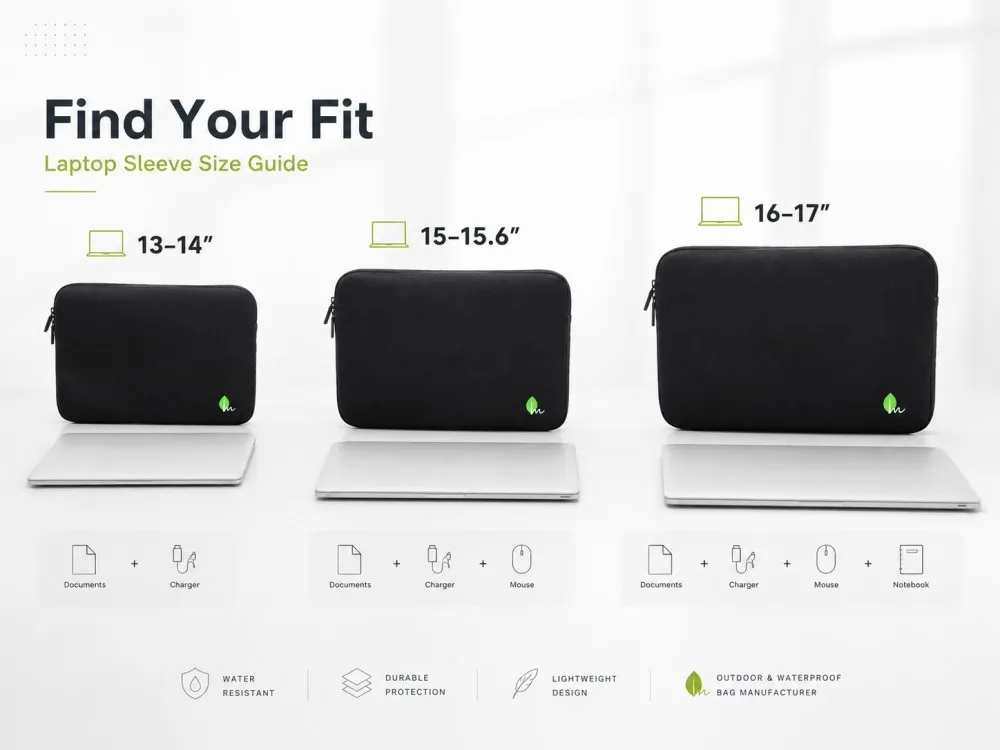
Laptop Sleeve Capacity: What Can Fit Inside?
Laptop sleeve capacity means what the sleeve can carry beyond the laptop itself. A slim sleeve and an accessory sleeve may both be sold for a 14-inch laptop, but they serve different users.
Capacity should be chosen before finalizing the pattern.
Slim Fit: Laptop Only
A slim laptop sleeve is designed for the laptop body only.
This style works well for:
- daily commuting
- office-to-meeting carry
- school bags
- laptops carried inside a backpack
- lightweight business travel
The benefit is clean shape and low weight. The downside is limited storage. A charging brick or mouse forced into a slim sleeve will create pressure points on the laptop shell.
Slim sleeves should stay slim.
Standard Fit: Laptop + Documents or Tablet
A standard laptop sleeve usually has a little more space or a separate flat pocket. It can carry a laptop plus thin items such as:
- paper documents
- notebook
- tablet
- slim cable
- pen
- passport or travel document
This is the most practical option for office workers and business travelers. It gives more flexibility without making the sleeve bulky.
For this type, the pocket structure matters. A flat front pocket is fine for documents. It is not ideal for a large charger.
Expanded Capacity: Laptop + Charger + Mouse
An expanded laptop sleeve is built for accessories.
It may include:
- external zippered pocket
- elastic organizer loops
- independent charger compartment
- thicker side gusset
- handle or detachable shoulder strap
This type is better for travel, field work, outdoor work, and hybrid workers who carry their full setup.
The tradeoff is size. A sleeve that carries a 15.6-inch laptop, charger, mouse, cable, and power bank may become too thick for a standard backpack laptop compartment. That is why outer dimensions need to be checked after capacity is chosen.
| Capacity Type | Best For | What It Usually Holds | Design Watchpoint |
|---|---|---|---|
| Slim fit | Commuting, backpack insert | Laptop only | Do not force charger inside |
| Standard fit | Office, meetings, school | Laptop + tablet or documents | Pocket should stay flat |
| Expanded capacity | Travel, outdoor work, mobile setup | Laptop + charger + mouse + cables | Check outer thickness and weight |
Capacity is not just storage. It changes the whole structure of the sleeve.
How to Choose a Laptop Sleeve for Different Use Cases
A laptop sleeve buying guide should not stop at dimensions. The same size can be built for commuting, business travel, outdoor work, or OEM product lines.
The correct design depends on where the sleeve will be used.
For Daily Commuting
A commuting laptop sleeve should be light, flat, and easy to slide into a backpack.
Good choices include:
- water-resistant outer fabric
- moderate foam padding
- smooth lining
- low-profile zipper
- outer dimensions that fit common backpacks
For a 13–14 inch laptop, many commuting users prefer a sleeve that adds less than 0.5 inch / 1.3 cm of bulk on each side. The sleeve should protect against scratches, minor bumps, and light rain exposure during transitions.
For heavy rain or cycling, commuting protection needs to move closer to outdoor protection.
For Business Travel
A business travel laptop sleeve needs a cleaner shape and better organization.
The user may carry the sleeve through airports, meetings, hotels, and customer visits. The sleeve may sit inside a briefcase one day and a carry-on backpack the next.
Useful features include:
- document pocket
- trolley bag compatibility
- slim handle
- professional surface finish
- durable zipper
- low-bulk padding
For travel, weight matters. Adding too much foam can make the product feel protective but inconvenient. A good travel sleeve balances padding, capacity, and packing efficiency.
For Outdoor, Cycling, and Waterproof Protection
A waterproof laptop sleeve needs more than a nice fabric label.
In the bag industry, water-resistant usually means the material can resist light rain or splashes for a short time. Waterproof means the structure is designed to block water more aggressively, often through coated fabric, sealed seams, waterproof zippers, roll-top construction, or welded construction.
Many laptop sleeves on the market are water-resistant, not fully waterproof.
For outdoor, cycling, kayaking support, camping, or wet commuting environments, look at the full structure:
| Feature | What It Does | Best Use |
|---|---|---|
| TPU or PVC coated fabric | Blocks water through the fabric surface | Rain, outdoor travel, wet ground contact |
| Oxford or nylon outer fabric | Adds abrasion resistance | Daily carry, commuting, field work |
| Water-resistant zipper | Reduces water entry through zipper line | Rain exposure, cycling |
| Sealed or welded construction | Reduces seam leakage | Higher waterproof performance |
| Foam or EVA padding | Absorbs bumps and compression | Laptop protection during movement |
| Reinforced corners | Protects the most vulnerable impact zones | Drops, backpack pressure |
| Soft lining | Prevents scratches on laptop shell | Daily insertion and removal |
A sleeve can be waterproof on the fabric surface and still leak at the zipper. That is a common design gap. For serious wet conditions, zipper choice and seam construction matter as much as fabric.
For Brands, Wholesalers, and OEM Buyers
For retail brands, promotional projects, and outdoor gear companies, a universal laptop sleeve size may not be enough.
OEM laptop sleeve development should define:
- target laptop size range
- inner dimensions
- outer dimensions
- padding thickness
- fabric type
- zipper type
- pocket layout
- logo position
- color options
- packaging method
A 14-inch sleeve for a business gift program is not the same product as a 14-inch waterproof sleeve for an outdoor backpack collection. They may share a size label, but the pattern, foam, material, and zipper should be different.
This is where custom laptop sleeve manufacturing has real value.
Common Laptop Sleeve Size Mistakes to Avoid
Most fit problems come from a few repeat mistakes.
The first mistake is buying by screen size only. A product title that says "fits 13–14 inch laptops" does not guarantee fit. Always check inner dimensions.
The second mistake is ignoring thickness. This is common with gaming laptops, rugged laptops, older laptops, and workstations. If the device is thick, do not force it into a slim sleeve.
The third mistake is reading outer dimensions as inner dimensions. Outer size tells you how large the sleeve is outside. It does not tell you how much usable laptop space is inside.
Another mistake is choosing a sleeve too large "just to be safe." Oversizing may make insertion easier, but the laptop can move inside the sleeve. That movement can reduce the value of the padding.
Accessory storage is another problem. A charger brick, mouse, adapter, and power bank should not be squeezed against the laptop screen or aluminum shell. If the user needs accessories, choose a sleeve with a separate pocket or expanded compartment.
Waterproof claims also need care. Water-resistant fabric is useful, but it does not mean the sleeve can survive heavy rain, soaking, or submersion. For outdoor products, the zipper, seams, and construction method must match the waterproof claim.
A good sleeve should fit without force, carry what it was designed to carry, and match the environment where it will be used.
FAQ
What size laptop sleeve do I need?
Measure your laptop's length, width, and thickness when closed. Then choose a laptop sleeve with inner dimensions slightly larger than those numbers. For most laptops, an extra 0.3–0.6 inch / 0.8–1.5 cm in length and width gives a comfortable fit. Thick laptops may need more space or a gusseted sleeve.
Should a laptop sleeve be tight or loose?
A laptop sleeve should be snug, not tight.
If it is too tight, the zipper, corners, and fabric will carry pressure. If it is too loose, the laptop can slide inside the sleeve and lose part of the shock protection.
Will a 13-inch laptop fit in a 13-inch sleeve?
Not always.
A 13-inch label refers to the screen diagonal. The laptop body may vary by brand, year, bezel width, and chassis shape. Always compare the laptop's actual body size with the sleeve's inner dimensions.
What size sleeve fits a 15.6-inch laptop?
Many 15.6-inch laptops need a sleeve with inner dimensions around 14.5–15.2 × 10.0–10.8 inches / 36.8–38.6 × 25.4–27.4 cm, depending on the exact model.
For a thick gaming laptop or workstation, check interior thickness carefully. A slim 15.6-inch sleeve may not close properly around a bulky device.
Can I put a charger and mouse inside a laptop sleeve?
Yes, but only if the sleeve is designed for accessories.
Choose a laptop sleeve with an external zippered pocket, separate accessory compartment, or expanded capacity design. Do not force bulky items into a flat sleeve, especially against the laptop screen side.
Do I need a waterproof laptop sleeve?
For indoor office use, a padded water-resistant sleeve is often enough.
For cycling, outdoor work, rainy commuting, camping, boating support, or wet travel conditions, a waterproof or highly water-resistant laptop sleeve is a better choice. Check the fabric, zipper, seams, and construction method before trusting the claim.
Find the Right Laptop Sleeve Size with Confidence
The right laptop sleeve size comes from three checks: measure the laptop body, compare it with the sleeve's inner dimensions, then confirm capacity and outer dimensions based on how the sleeve will be carried.
Do not buy by screen size alone.
Do not ignore thickness.
Do not treat water-resistant and waterproof as the same thing.
For brands, retailers, and outdoor gear companies, FENGLINWAN manufactures custom waterproof laptop sleeves and waterproof bags with OEM/ODM options, including custom dimensions, coated fabrics, padding structures, colors, pockets, and logo branding. Contact us to discuss a sleeve design built around your target laptop size, capacity, and use environment.